LvW-harness
A local-first AI agent with a one-command model manager for Hugging Face, GitHub and GitLab.
Install · Models · Agent · Web UI · VPS · Commands · Credits




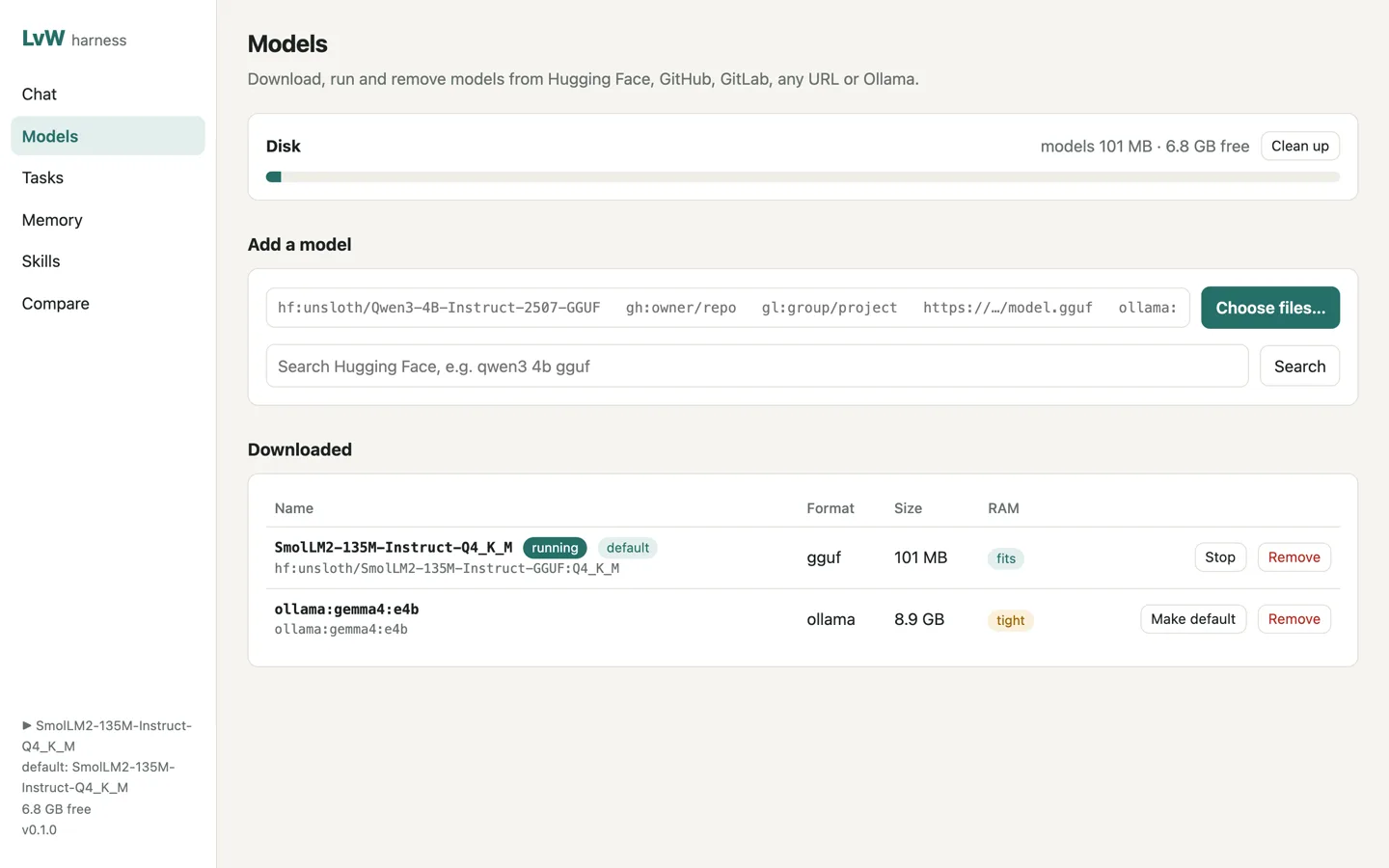
LvW runs an agent on your own computer or server. It reads and edits files, runs commands, browses the web, remembers things between sessions and follows skills. Models run locally through llama.cpp or Ollama, so nothing has to leave your machine. Cloud models work too if you add a key.
The model manager is the main feature. One command downloads a model from Hugging Face, a GitHub or GitLab release, any URL or Ollama, and one command removes it again with every file it brought.
lvw model pull hf:unsloth/Qwen3-4B-Instruct-2507-GGUF:Q4_K_M   # 2.5 GB
lvw chat
lvw model rm Qwen3-4B-Instruct-2507-Q4_K_M                       # frees the 2.5 GB
Project page: gitguy268.github.io/LvW-harness · lvw-harness.vercel.app
Install with Homebrew
brew trust gitguy268/tap
brew install gitguy268/tap/lvw-harness
Then run lvw setup once, and lvw (or lvw serve for the web UI).
Run it locally, step by step
Install Bun 1.4 or newer (macOS on Apple silicon, or Linux).
Get the code:
git clone https://github.com/Gitguy268/LvW-harness.git
cd LvW-harness
Install it:
bun install
bun link
Set it up. This downloads llama-server (about 30 MB) and offers a starter model:
lvw setup
lvw doctor
Start it with
lvw, or double-clickstart.commandon a Mac for the web UI at http://localhost:7878/.
Install
You need Bun 1.4 or newer on macOS (Apple silicon) or Linux.
git clone https://github.com/Gitguy268/LvW-harness.git
cd LvW-harness
bun install
bun link            # puts `lvw` on your PATH
lvw setup           # downloads llama-server (~30 MB), installs the bundled skills, offers a starter model
lvw doctor          # checks disk, memory, runtimes, browser and tokens
On a Mac you can also double-click start.command. It installs what's missing, starts the web UI and opens it in your browser.
To build a single binary that doesn't need Bun: bun run build (this machine) or bun run build:all (macOS arm64, Linux x64 and Linux arm64, in dist/).
Models
| Source | Example | What it downloads |
|---|---|---|
| Hugging Face | hf:unsloth/Qwen3-4B-Instruct-2507-GGUF:Q4_K_M |
one quant; leave out :Q4_K_M to choose from a list, add --all for the whole repo |
| GitHub release | gh:owner/repo@v1.2:*.gguf |
release assets matching the glob (newest release without @tag) |
| GitLab release | gl:group/project@v1.2:*.gguf |
the same for gitlab.com, or your own GitLab with LVW_GITLAB_URL |
| Any URL | https://example.com/model.gguf |
that file |
| Ollama | ollama:qwen3:4b |
passed through to your running Ollama |
- Resumes interrupted downloads and checks sha256 where the host publishes it (Hugging Face LFS files, GitHub release assets).
- Checks free disk first and refuses a download that would leave less than 2 GB (
lvw config set minFreeGB 5to change it). - Estimates RAM for each GGUF and marks it fits, tight or too big for this machine.
lvw model rmdeletes the files and the registry entry and prints the space freed.lvw model gccleans up unfinished downloads.- GGUF models run through llama.cpp (
lvw model run <name>). Other formats (safetensors, ONNX…) can be downloaded and removed but not run by LvW.
Gated or private models need a read token: lvw login hf|gh|gl, or HF_TOKEN, GITHUB_TOKEN, GITLAB_TOKEN. Tokens are stored in ~/.lvw/credentials.json with mode 600 and are never logged.
Agent
lvw chat                         # terminal chat; asks before it changes anything
lvw run "add a --verbose flag to cli.ts and run the tests"
lvw research "how do llama.cpp quant types compare?"
| Tools | read, write, edit, grep, glob, bash; web search and fetch; a Playwright browser with its own isolated profile per chat; memory; skills; task board; subagents; MCP servers; plugins |
| Permissions | ask (default) asks before writes, commands that change things, and clicking or typing on websites. --auto stops asking, except for commands that look dangerous and writes outside the working folder. --readonly blocks all changes. --sandbox docker runs commands in a container without network |
| Memory | Markdown notes in ~/.lvw/memory (everywhere) and .lvw/memory (this project), with full-text search. AGENTS.md or CLAUDE.md in the folder are read as project rules |
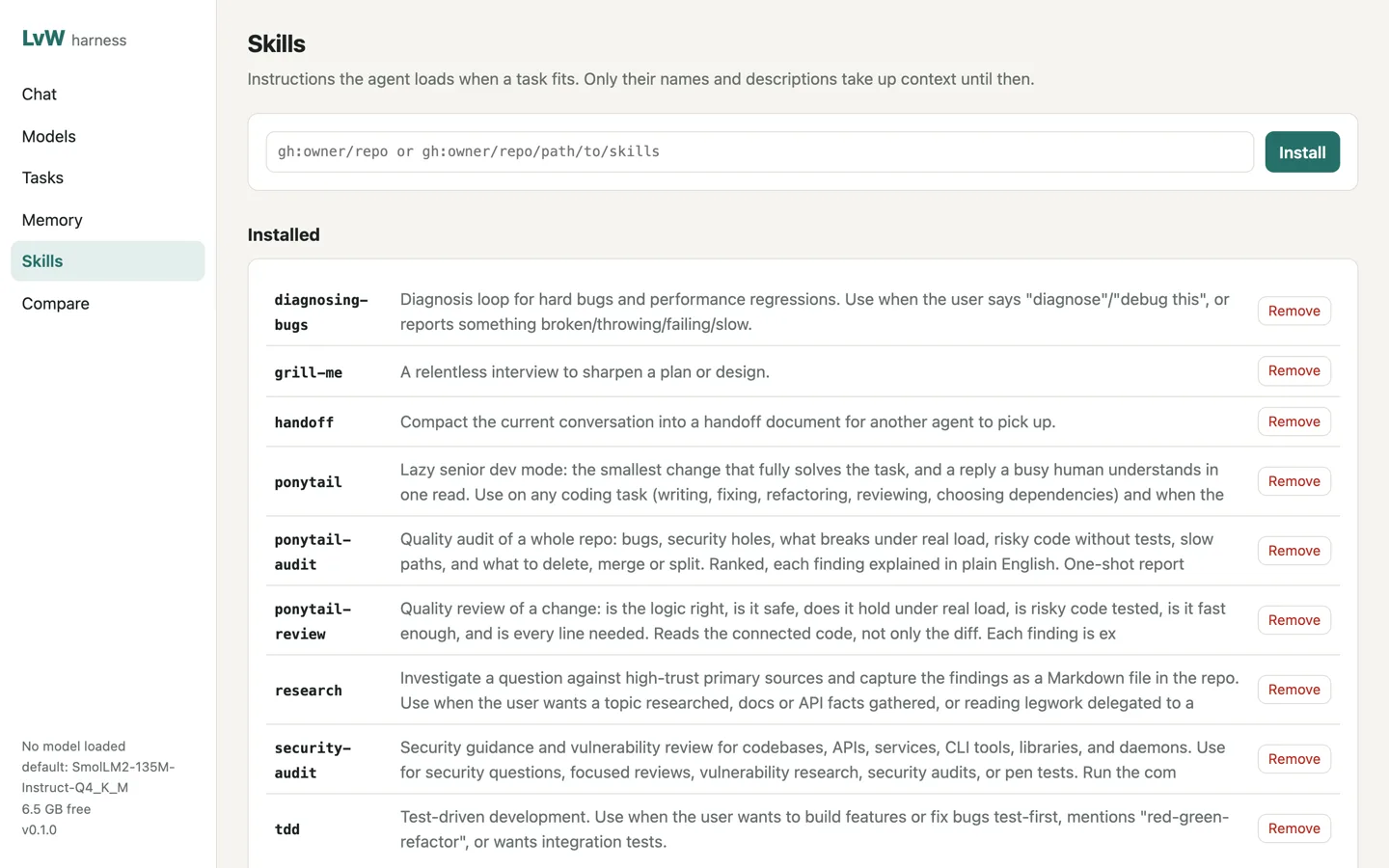
| Skills | the SKILL.md format. 18 skills are bundled: design work with impeccable, repository onboarding, code review, debugging, TDD, security audit and more. lvw skill browse lists the 90-odd plugins of wshobson/agents, and adding one brings its skills and subagents; lvw skill add gh:owner/repo installs others. Only names and descriptions go into the prompt, and the full text loads when needed |
| Budgets | 40 turns and 400k tokens per run by default (budgets in the config, --max-turns) |
Tasks, routines and approvals
lvw task add "Write release notes for 0.1.0" --budget 50000
lvw task run 1                     # the agent works on it; the result goes on the task
lvw routine add news "0 8 * * 1-5" "Summarise the AI news"   # runs while `lvw serve` is running
lvw task ls                        # also lists approvals waiting for you
lvw task approve 1
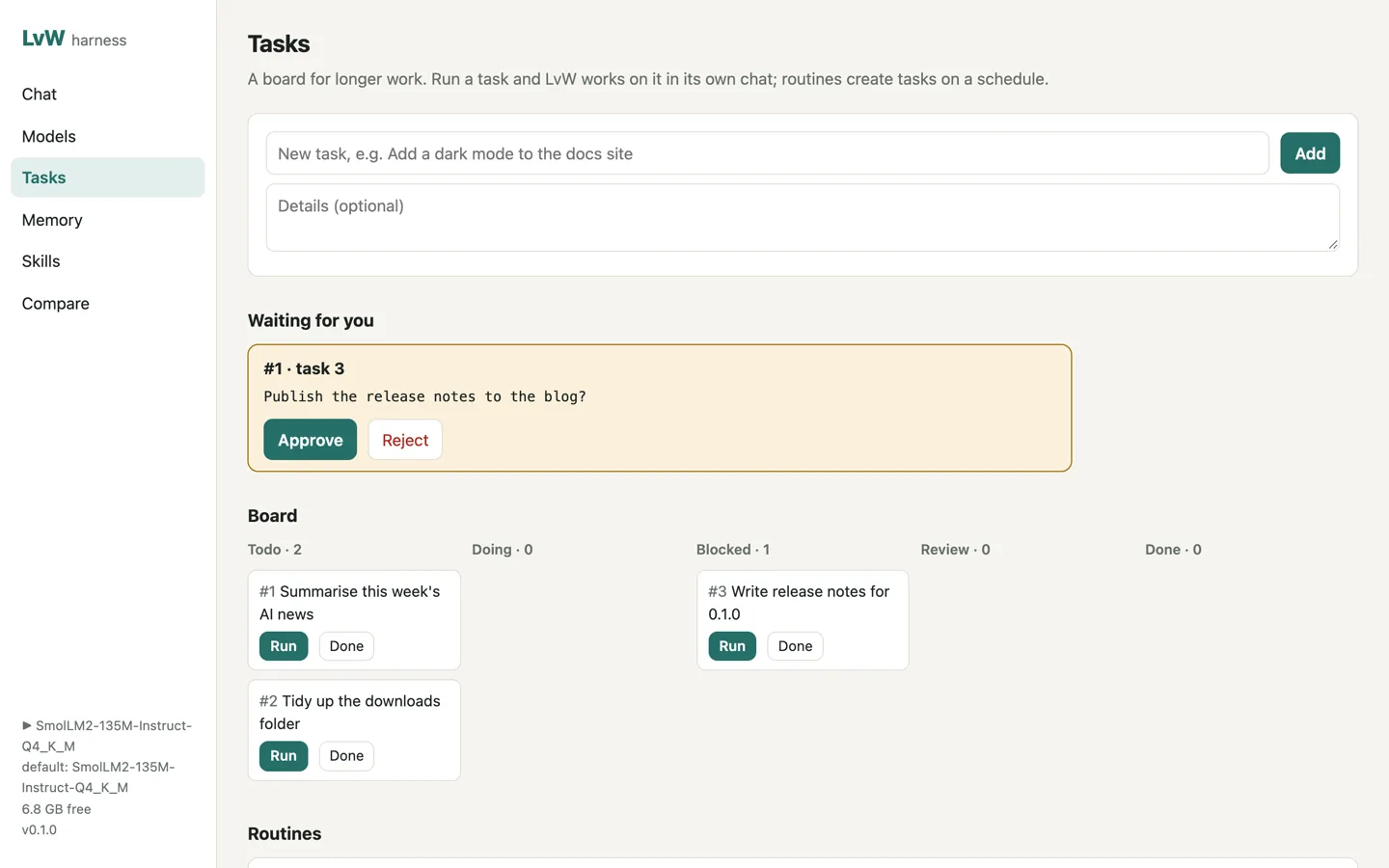
When the agent needs a decision (publishing, spending, deleting data) it calls request_approval, the task is marked blocked, and it waits for you on the Tasks page or lvw task approve|reject.
MCP servers, plugins and the scrape tool
lvw mcp add files -- npx -y @modelcontextprotocol/server-filesystem ~/notes
lvw mcp add remote --url https://example.com/mcp
lvw mcp ls                         # starts each server and lists its tools
lvw tool install scrapling         # adds web_scrape for pages plain fetching can't read (uses uv)
A plugin is a folder in ~/.lvw/plugins/<name>/ with a plugin.json ({"name": "...", "description": "..."}) and an index.ts that exports tools(ctx) returning extra tools. A skills/ folder inside the plugin adds skills. lvw plugin ls shows what loaded.
Using a cloud model or your own browser
--model takes a downloaded model's name, ollama:<name>, or <provider>:<model-id> for any provider pi-ai supports, with its usual API key in the environment (for example ANTHROPIC_API_KEY or OPENAI_API_KEY). lvw model use <name> sets the default.
To let the browser tools use your logged-in browser, start it with --remote-debugging-port=9222 and run lvw config set browser.cdpUrl http://127.0.0.1:9222. The agent then opens its own tabs in that browser.
Web UI
lvw serve # http://127.0.0.1:7878
The web UI has pages for Chat (with approval cards and a preview of HTML or SVG the agent writes), Models, Tasks, Memory, Skills and Compare (one prompt sent to several models side by side). It loads nothing from the internet and works offline.
 |
 |
VPS
The server only listens on 127.0.0.1 unless you tell it otherwise. Any other address needs a login token: set LVW_TOKEN, or LvW generates one and prints it.
Docker (the image includes llama-server and headless Chromium):
echo "LVW_TOKEN=$(openssl rand -base64 24)" > .env
docker compose up -d               # web UI on 127.0.0.1:7878; models in the lvw-data volume, the agent's files in lvw-work
docker compose exec lvw lvw model pull hf:unsloth/Qwen3-4B-Instruct-2507-GGUF:Q4_K_M
Keep the port local and put HTTPS in front of it (see "HTTPS with Caddy" below). The login cookie is marked Secure here, so logging in over plain http://<server-ip>:7878 won't stick, and it would send your token unencrypted. Only set LVW_BIND=0.0.0.0 in .env when an HTTPS proxy on another machine needs to reach the port. Build without the browser with docker compose build --build-arg WITH_BROWSER=0.
Bare Linux server (x64 or arm64, with systemd):
bun run build:all                                  # on your machine
scp dist/lvw-linux-x64 install.sh deploy/lvw.service you@server:
ssh you@server 'mkdir -p deploy && mv lvw.service deploy/ && sudo LVW_BINARY=./lvw-linux-x64 sh install.sh'
The server needs glibc 2.38 or newer (Ubuntu 24.04, Debian 13 or later) to run current llama.cpp builds. install.sh creates an lvw user, data in /var/lib/lvw, a token in /etc/lvw.env, installs llama-server and starts the lvw service on 127.0.0.1:7878. Once releases are published it can download the binary itself (curl -fsSL …/install.sh | sudo sh).
HTTPS with Caddy
lvw.example.com {
    reverse_proxy 127.0.0.1:7878
}
Caddy gets the certificate itself. Open https://lvw.example.com and log in with the token.
Experimental
lvw telegramruns a Telegram bot, so you can talk to LvW from your phone. Create a bot with @BotFather, runlvw login telegram, then message the bot: it replies with the command that allows your chat. Approvals show up as Yes / Always / No buttons. The bot polls Telegram, so it needs no public address.lvw improve "<task>" --name pruns the same task with four prompt strategies (baseline, plan-first, verify, lean), each in a scratch copy of the folder, has the model grade every result, and saves the winner as a profile you use withlvw run --profile p. The grades are only as good as the model giving them.
All commands
Models
  lvw model search|info|pull|ls|rm|du|gc|run|stop|use   download, run and remove models
  lvw runtime [install|update|rm]                         llama.cpp runtime
  lvw login|logout hf|gh|gl|telegram                      tokens for gated models and the Telegram bot

Agent
  lvw chat [--model m] [--auto|--readonly] [--sandbox docker]   terminal chat
  lvw run "<task>" [--yes] [--json]                     one task, no questions
  lvw research "<question>"                             deep research report
  lvw serve [--host h] [--port p]                       web UI and API (default 127.0.0.1:7878)
  lvw telegram                                          talk to LvW from Telegram
  lvw improve "<task>" [--name p]                       experimental: tune a prompt profile (--profile p)

Extras
  lvw repo init                      add AGENTS.md and a repo map, keeping what exists
  lvw skill ls|add|browse|rm|show|approve   lvw memory ls|search|add|rm
  lvw task ls|add|show|run|done      lvw task approve|reject <id>
  lvw routine ls|add|rm|on|off
  lvw mcp ls|add|rm                  lvw tool install|rm scrapling
  lvw plugin ls

Setup
  lvw setup [--yes]   lvw doctor   lvw config [get|set|path]   lvw version
Data lives in ~/.lvw (set LVW_HOME to move it). Ports: web UI 7878, llama-server 7879.
Limits
- Small local models (around 4B) handle short tasks well but get unreliable over long chains of tool calls. Hard coding work goes better with a bigger model or a cloud key.
- Only GGUF models run locally through llama.cpp. Other formats are stored, not run.
--sandbox dockercovers shell commands only. File tools still work directly in the folder you started in.
Contributing and licence
See CONTRIBUTING.md, the Code of Conduct and SECURITY.md for reporting vulnerabilities.
MIT © Lucas Van De Weerd. Bundled skills keep their own MIT licences, and models you download keep theirs. LvW reuses ideas from many projects, each credited in NOTICE.md. It isn't affiliated with Hugging Face, GitHub, GitLab, Telegram or Ollama.